What Is Web Hosting and How It Works Explained
If you have ever tried to build a website and hit a wall trying to understand what you actually need to get it online, you are not alone. Web hosting is the foundational service that makes any website publicly accessible on the internet and understanding it is the first step toward launching anything online.
By the end of this guide, you will know exactly what web hosting is, how it functions behind the scenes, the different types available, and what to look for when picking a provider. No technical background required.
What Is Web Hosting?
Web hosting is a service that provides the infrastructure servers, storage, and network connectivity needed to store your website’s files and make them accessible to anyone with an internet connection. Think of it as renting space on a powerful computer that runs 24/7.
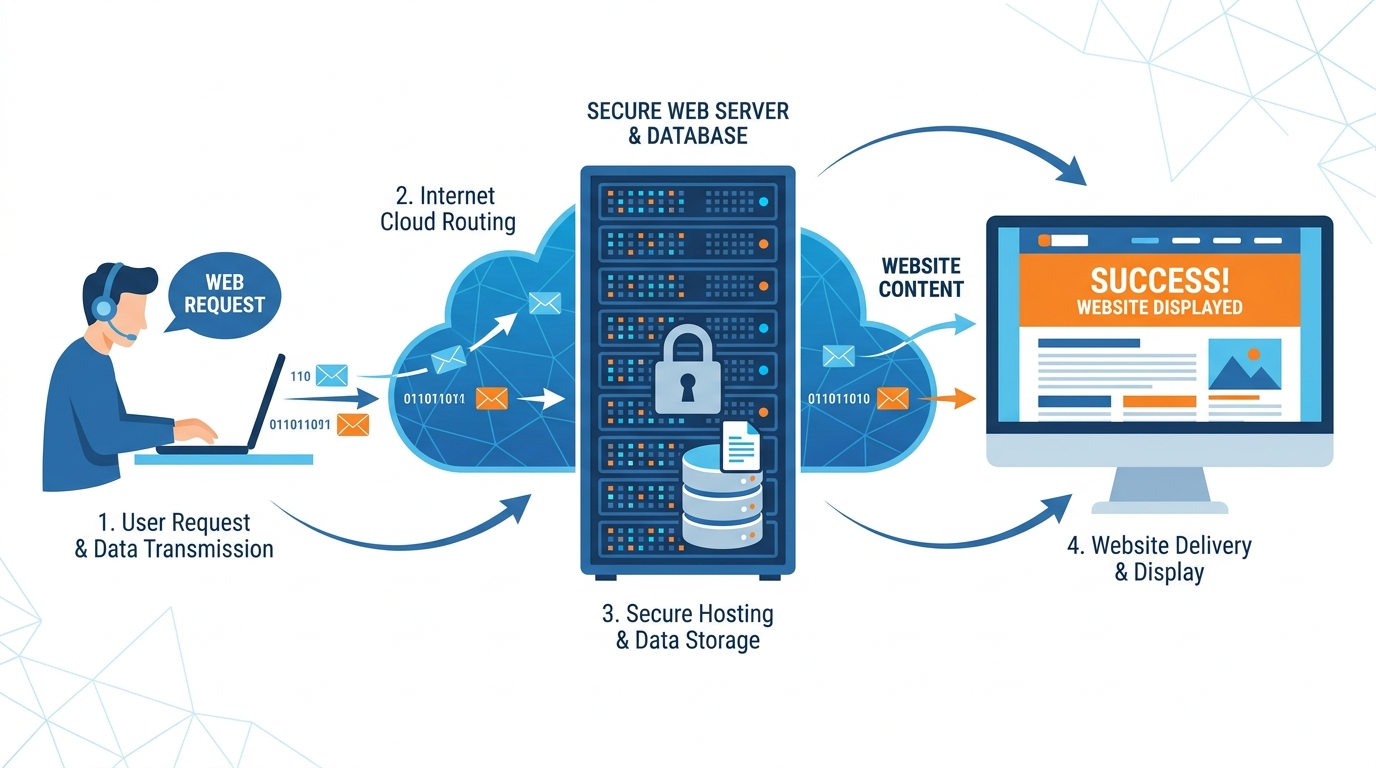
When someone types your domain name into a browser, that browser connects to your hosting server, retrieves your website’s files, and displays them on screen. Without a hosting service, your site simply cannot exist online. You can read a broader overview of web hosting services on Wikipedia for additional context on how the industry developed.
How Does Web Hosting Work?
Every website is made up of files HTML documents, images, videos, databases, and code. A web hosting provider stores these files on physical or virtual servers located in data centers around the world. These servers are connected to high-speed internet pipelines to ensure fast delivery of your content.
When a visitor enters your URL, the Domain Name System (DNS) translates that address into an IP address pointing to your hosting server. The server then processes the request and sends the correct files back to the visitor’s browser in milliseconds. IBM’s technical breakdown of web hosting explains this request-response cycle in greater depth if you want the engineering details.
Main Types of Web Hosting Explained
Not every website has the same needs. Hosting providers offer several distinct service models, each built for different traffic levels, budgets, and technical requirements.
Shared Hosting
With shared hosting, your website shares a single server and its resources CPU, RAM, and storage with hundreds of other websites. This makes it the most affordable entry point, ideal for small blogs, portfolios, or new business sites. The trade-off is that heavy traffic on a neighboring site can slow yours down. If you are weighing your options, compare WordPress hosting vs shared hosting to decide which model fits your goals better.
Virtual Private Server (VPS) Hosting
VPS hosting partitions a single physical server into multiple isolated virtual environments. Each virtual server gets dedicated resources, so your site’s performance is not affected by other users on the same machine. VPS is the go-to middle ground for growing websites that have outgrown shared plans but do not yet need a full dedicated server.
Dedicated Server Hosting
With a dedicated server, you lease an entire physical machine exclusively for your website. You get maximum control, performance, and security. This option suits large e-commerce platforms, enterprise applications, or any site handling significant daily traffic. It comes at a premium monthly cost but delivers unmatched reliability.
Cloud Hosting
Cloud hosting distributes your website across a network of interconnected servers rather than relying on a single machine. If one server fails, another takes over instantly. This architecture provides superior uptime and on-demand scalability, making it popular for rapidly growing or high-traffic websites. Google Cloud’s guide on web hosting offers a clear look at how cloud infrastructure supports modern websites.
How to Choose the Right Web Hosting Services
Selecting a provider starts with matching the hosting type to your actual needs. A personal blog runs perfectly on cheap shared hosting, while an online store processing hundreds of daily transactions needs VPS or dedicated resources at minimum.
Always check the provider’s renewal pricing, not just the introductory rate. Many cheap web hosting plans spike in cost after the first term. Also confirm that your chosen plan supports the platform you plan to use — especially if you are building with WordPress. Our roundup of the best web hosting providers compares top options across price, performance, and features to save you research time.
Key Hosting Features to Look For: Uptime, Security, and Speed
Beyond price and type, three technical factors separate reliable hosting from unreliable hosting. Evaluate each one before committing to a plan.
- Uptime Guarantee: Look for providers offering 99.9% uptime or higher. Even 0.1% downtime equals roughly 8 hours of outages per year.
- Security Measures: Confirm the provider includes SSL certificates, firewalls, malware scanning, and regular backups. These are non-negotiable for any live website.
- Speed and Performance: Check whether the host uses SSD storage, a Content Delivery Network (CDN), and server locations close to your target audience.
- Scalability: Your needs will grow. Choose a host that allows you to upgrade your plan without migrating to a new provider.
- Customer Support: 24/7 live chat or phone support is essential, particularly when a technical issue takes your site offline.
If you plan to build on WordPress specifically, understanding the platform itself will help you make a smarter hosting decision start with this primer on what WordPress is and how it works before locking in your hosting plan.
With a clear picture of what web hosting is, how it operates, and what separates a strong provider from a weak one, you are ready to make a confident, informed decision and get your website online.